Comparison
iPad vs iPad Air: Which iPad Should You Buy?
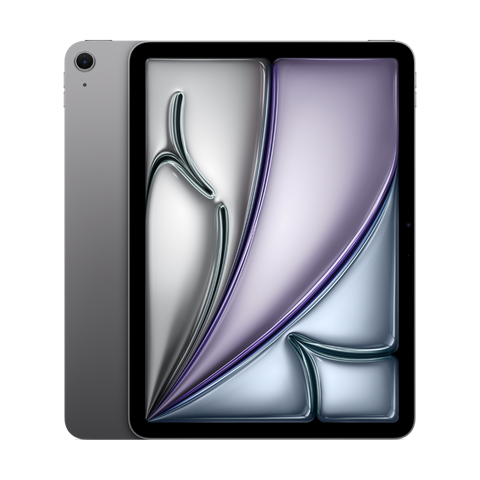
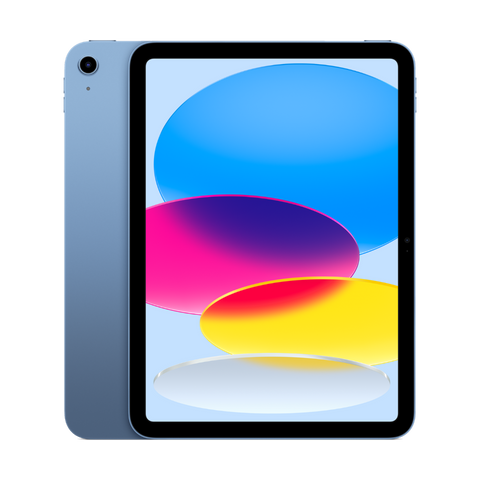
The iPad Air (M3) is the better buy for most people thanks to the M3 chip, Apple Intelligence, a laminated P3 screen and Apple Pencil Pro support. The iPad (A16) is still a strong pick for streaming, browsing, school and kids.

Buy the iPad (A16) if you want a great tablet for video, browsing, notes and school at the lowest price. Buy the iPad Air (M3) if you want Apple Intelligence, a better screen, Apple Pencil Pro support, a 13-inch option or a tablet that can stand in for a laptop.
You want Apple Intelligence
You draw, sketch or edit photos and video
You want a 13-inch screen
You want to use it like a laptop with a Magic Keyboard
It is mostly for streaming, browsing, reading and email
It is for a child or a student taking notes
You want the lowest price on a current iPad
You do not need Apple Intelligence
Skip both if: you want a 120Hz or OLED screen. Neither has one. Look at the iPad Pro (M4).
The short version
The base iPad and the iPad Air look almost the same from the front. Both have an 11-inch Liquid Retina screen, Touch ID in the top button, a 12MP front camera on the long edge and USB-C. Apple rates both at up to 10 hours of web browsing or video on Wi-Fi.
The gap is inside. The iPad Air uses the M3 chip, the same family of chip used in Macs. It supports Apple Intelligence, the newer Apple Pencil Pro and the Magic Keyboard for iPad Air. The base iPad uses the A16 chip, does not support Apple Intelligence, and works with the Apple Pencil (USB-C) and the Magic Keyboard Folio.
The Air also has the better screen. It is fully laminated with an anti-reflective coating and wide P3 colour. And the Air comes in a 13-inch size. The base iPad only comes in 11 inches.
What's different
See every spec side by side
| iPad (A16) | iPad Air 11-inch (M3) | iPad Air 13-inch (M3) | |
|---|---|---|---|
| Released | 2025 | 2025 | 2025 |
| Screen | 11" Liquid Retina (LCD) | 11" Liquid Retina (LCD) | 13" Liquid Retina (LCD) |
| Brightness | 500 nits | 500 nits | 600 nits |
| Laminated, anti-reflective, P3 | No | Yes | Yes |
| Refresh rate | 60Hz | 60Hz | 60Hz |
| Chip | A16 (5-core CPU, 4-core GPU) | M3 (8-core CPU, 9-core GPU) | M3 (8-core CPU, 9-core GPU) |
| Apple Intelligence | No | Yes | Yes |
| Storage | 128GB, 256GB, 512GB | 128GB to 1TB | 128GB to 1TB |
| Apple Pencil | Apple Pencil (USB-C), 1st gen with adapter | Apple Pencil Pro, Apple Pencil (USB-C) | Apple Pencil Pro, Apple Pencil (USB-C) |
| Keyboard | Magic Keyboard Folio | Magic Keyboard for iPad Air | Magic Keyboard for iPad Air (13-inch) |
| Cameras | 12MP back, 12MP Center Stage front | 12MP back, 12MP Center Stage front | 12MP back, 12MP Center Stage front |
| Port | USB-C (USB 2, up to 480Mb/s) | USB-C (USB 3, up to 10Gb/s) | USB-C (USB 3, up to 10Gb/s) |
| Wi-Fi | Wi-Fi 6 | Wi-Fi 6E | Wi-Fi 6E |
| Battery | Up to 10 hours | Up to 10 hours | Up to 10 hours |
| Thickness | 7 mm | 6.1 mm | 6.1 mm |
| Weight (Wi-Fi) | 477 g | 460 g | 616 g |
| Unlock | Touch ID (top button) | Touch ID (top button) | Touch ID (top button) |
| Refurbished price | From $529.99 | From $779.99 | From $1,009.99 |
Chip and Apple Intelligence
The M3 in the iPad Air has an 8-core CPU and a 9-core GPU.
Read more
The A16 in the base iPad has a 5-core CPU and a 4-core GPU. For Netflix, YouTube, web pages, email and most games, the A16 is plenty. You will feel the M3 in heavy photo and video editing, big drawing files with many layers, and demanding games.
The bigger split is software. Apple Intelligence, with features like Writing Tools and Image Playground, needs an M-series iPad or the iPad mini (A17 Pro). The iPad Air (M3) supports it. The iPad (A16) does not. If you want those features, that decides it.
Screen quality
Both 11-inch screens have the same 2360 by 1640 resolution, 500 nits brightness and a 60Hz refresh rate.
Read more
Neither is OLED or 120Hz.
The difference is in how the screen is built. The iPad Air screen is fully laminated, so the glass and the display sit together with no air gap. Drawing feels like the pencil tip touches the image, not a layer of glass above it. The Air also has an anti-reflective coating and wide P3 colour, so it looks richer and handles glare better. The base iPad screen is not laminated.
Want a big screen? The 13-inch iPad Air has a 2732 by 2048 screen at 600 nits. It is great for split-screen work, reading sheet music or drawing.
Apple Pencil and keyboards
The iPad Air supports the Apple Pencil Pro, with squeeze, barrel roll, haptic feedback and hover.
Read more
It also works with the Apple Pencil (USB-C). It attaches to the side of the Air magnetically.
The iPad (A16) works with the Apple Pencil (USB-C) and the first-generation Apple Pencil through a USB-C adapter. It does not support the Apple Pencil Pro. For notes and homework that is fine. For serious drawing, the Air is the better tool.
For typing, the base iPad uses the Magic Keyboard Folio. The iPad Air uses the Magic Keyboard for iPad Air, which holds the screen in a floating stand and has a trackpad. Accessories are not shared between the two, so pick your tablet first.
Ports, Wi-Fi and design
The iPad Air has a faster USB-C port: USB 3 at up to 10Gb/s, against USB 2 at up to 480Mb/s on the base iPad.
Read more
That matters if you move large photo or video files to a drive or computer. The Air also has Wi-Fi 6E against Wi-Fi 6.
The Air is thinner at 6.1 mm against 7 mm, and a little lighter in the 11-inch size. Both have landscape stereo speakers and a front camera on the long edge, which is better for video calls with a keyboard attached.
What about older models and the newest Air?
Older iPads are another option.
Read more
The iPad (10th gen) has the same design as the A16 with the older A14 chip. The iPad Air (M2) and iPad Air (M1) also support Apple Intelligence and the Air keyboards. The M2 Air also supports the Apple Pencil Pro. For most people the M2 Air is a strong middle ground.
Apple now sells a newer iPad Air with the M4 chip. We don't carry it refurbished yet. For everyday use, the M3 already has more power than most people need.
Price range
Refurbished, the iPad (A16) starts at $529.99, the 11-inch iPad Air (M3) starts at $779.99, and the 13-inch iPad Air (M3) starts at $1,009.99. Older models like the iPad (10th gen) start at $395.99. Prices on this page update live from our store.
See every model in our iPad collection or go straight to the iPad Air. Upgrading from an older tablet? You can sell or trade it in.
Should you buy new or refurbished?
iPads hold up well, which makes refurbished a smart buy.
Read more
Every iPad we sell is inspected and tested and comes with up to a 1-year warranty and 14-day returns. Grades describe looks only. Want to know how refurbished compares with new and used? Read new vs used vs refurbished.
FAQ
Is the iPad Air worth it over the regular iPad?
Yes if you want Apple Intelligence, a laminated screen, the Apple Pencil Pro or a 13-inch size. If you mostly watch video, browse and take notes, the regular iPad does the job.
Does the iPad (A16) support Apple Intelligence?
No. Apple Intelligence on iPad needs an M-series chip or the A17 Pro in the iPad mini. The iPad Air (M3) supports it.
Does the iPad (A16) work with the Apple Pencil Pro?
No. It works with the Apple Pencil (USB-C) and the first-generation Apple Pencil with a USB-C adapter. The iPad Air (M3) supports the Apple Pencil Pro.
Are the iPad and iPad Air the same size?
The 11-inch models are very close in size. The iPad Air is thinner, 6.1 mm against 7 mm, and slightly lighter. The Air also comes in a 13-inch size.
Which iPad is best for students?
For notes, reading and video, the iPad (A16) does the job. For art school, design or video editing, get the iPad Air for the M3 chip, the laminated screen and Apple Pencil Pro support.
Évitez le prix du neuf
Procurez-vous le iPad Air 11 pouces (M3) d'occasion à partir de $779.99, testé par de vrais techniciens, avec une garantie d'un an et des retours sous 14 jours.